From your first pulse to a clearer next step

TrustXP helps you ask regularly about the conditions that shape trust, understand the results and decide what to address. Employees answer short pulses. Account admins follow the scores and use the guidance to support their decisions.

1

Add the people you want to invite

Import a CSV, paste a contact list or add people manually. Check the details before sending invitations. Employees receive their pulse links by email; they do not need to install anything.

2

Choose a schedule you can maintain

Run pulses weekly, every two weeks or monthly. Each pulse contains two to four short questions, drawn from the five drivers of the Compounding Trust framework.

Choose a rhythm that gives you time to review the results and respond. Asking more frequently is useful when you can keep up with what people tell you.

3

Give people confidence to answer

Responses are anonymous. TrustXP does not display department comparisons or manager rankings. A driver score is shown only after at least five responses have been received for that driver.

Before the first pulse, explain why you are asking, how the results will be used and when people will hear back from you.

Read how response anonymity works →

4

Read the scores in context

The dashboard shows your Trust Score, a breakdown across the five drivers and trends over time as readings become available.

Look at both the level and the direction. A low score deserves attention, but so does a sustained decline. Use the findings to explore what employees are experiencing rather than treating a number as a complete explanation.
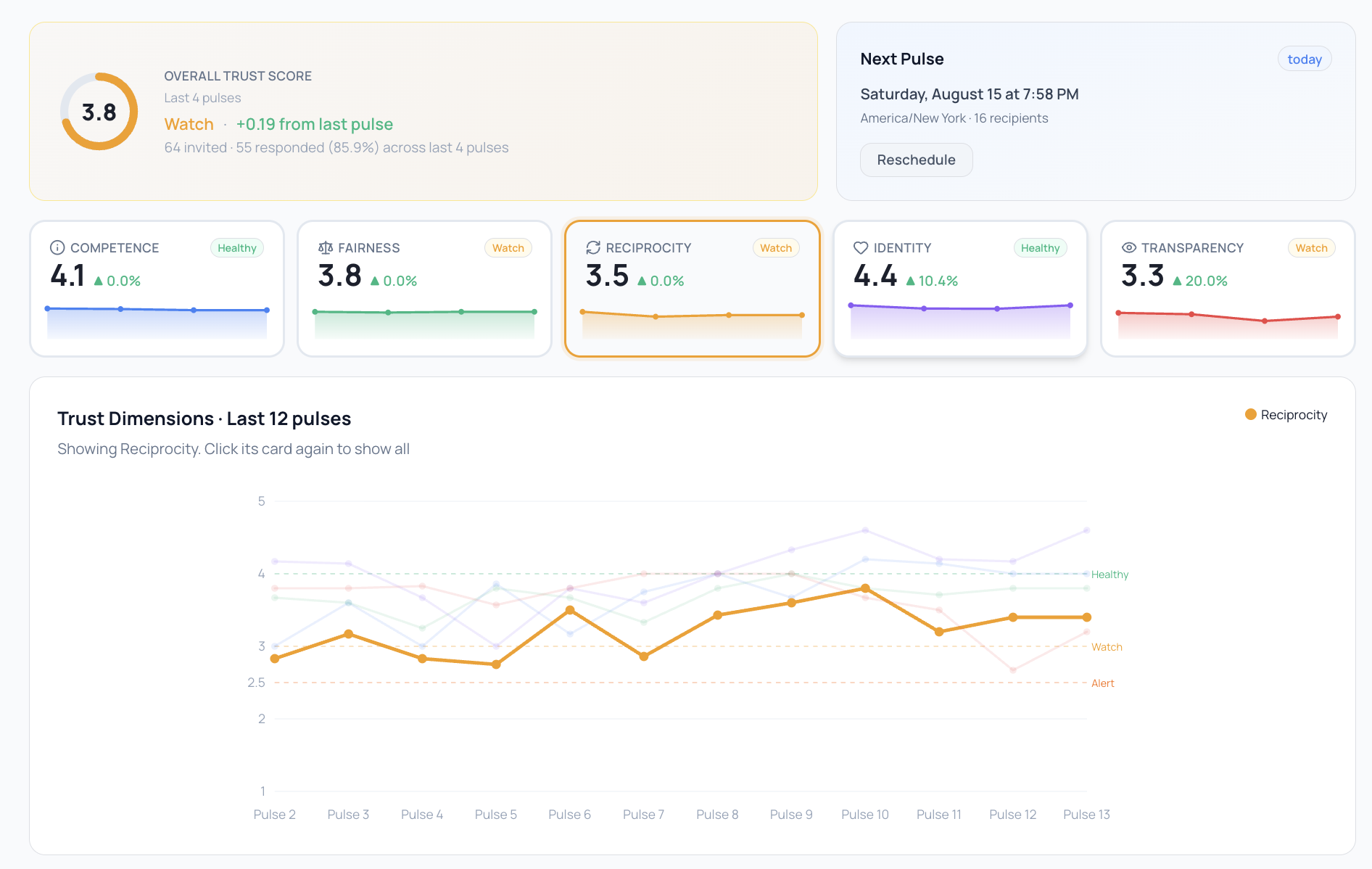
TrustXP dashboard showing the overall Trust Score and five-driver breakdown
5

Explore recommendations based on your scores

TrustXP provides recommendations linked to the results. These give you a starting point for action: a decision to review, a conversation to have or a working practice to examine.

Choose what fits the situation. Make the response visible to employees and revisit it as further results become available.

6

Ask the book

Account admins can ask questions about Compounding Trust and explore how the framework applies to a situation. Use it to understand a driver, prepare a conversation or consider possible responses.

Ask the book does not automatically access employee responses or other account data. It works with the questions and information you choose to enter. Describe situations without names or identifying details, and use the responses to support your judgment.

What TrustXP does not do

  • Monitor employee messages or individual productivity
  • Provide department comparisons or manager rankings
  • Offer public API access or SSO at present

The product focuses on organization-wide trust measurement and helping leaders act on what they learn.

Start free →

No payment details required to get started.

Start measuring trust in your organization

Create an account, add your people and send your first pulse. Use the results to decide what deserves attention.

Start free →
No payment details required to get started.